
ROLE:
UI/UX Designer
PROJECT TYPE:
UI/UX
SCOPE:
6 weeks
DELIVERABLE:
APP
Tools: Figma, Figjam Zoom and
Google Docs
smartpit


User testing
Task
-1) Open a reminder tab
-2) Select an item under promotions and discounts
-3) Go to the profile section and go to vehicle expenses
4) Edit the car information
-5) Go to the progress section and create a new item
-6) edit an item in the progress section
-7) add an invoice to the added item
Post Test Questions
What was your favorite part of the app?
If you found any task difficult, please tell me which one and why?
Would you continue to use this app?
Would you recommend the app to your acquaintances?
Results
70% of the participants enjoyed this particular experience and would continue to use the application.
90% of the participants were able to complete all the tasks successfully.
10% of the participants were unable to complete some of the tasks and complained about the experience.
What I learn
Design system
I learned to identify and find users interested in sharing their opinions about the app through social media groups.
I also learned to follow the suggestions of users so that in future developments of the MVP I can add the relevant search engines to improve the quality of the user experience of the app.
Comments
Positive
“It's well organized and I like that I can see the places where they perform maintenance.”
“I like that I can see the progress of what I have already done on the car.
"I find the expense chart interesting.”
Negative
“I don't like that it is called “item” , when I go to register a service I perform on the car”.
“I would like to have a search engine in case I need a particular service”.
Suggestions
“I would like to be able to search for specific workshops and not just services.”
I would like a different color to classify each service category.
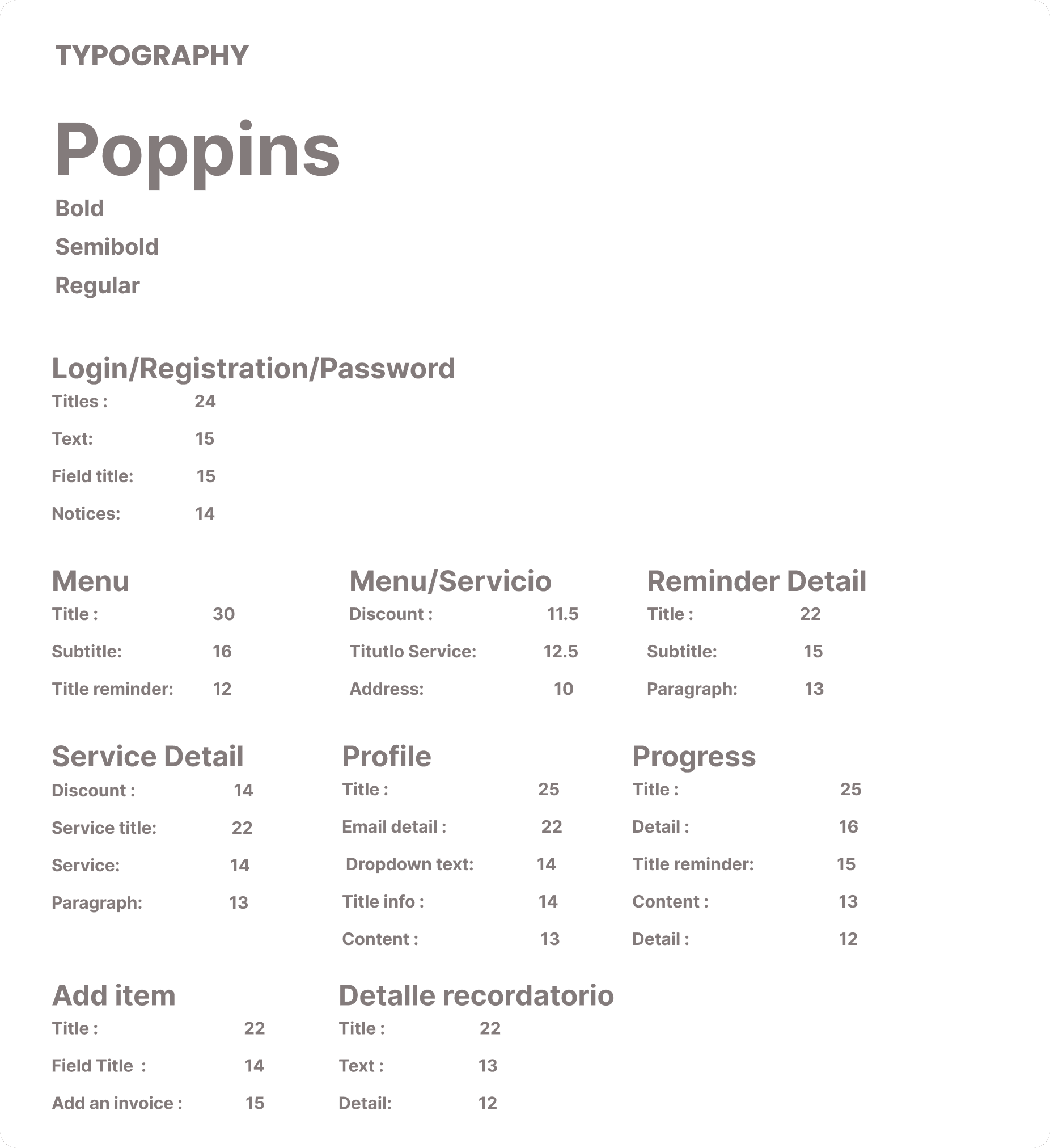


Text color
Icons
App logo
Detail color
Background colors of the detail
Main colors
Fied color


Proyect Goal
App that allows you to record the maintenance of vehicles and add reminders, including announcements of places where maintenance can be performed.
Problem
Keeping track of expenses and necessary car maintenance has become difficult due to :
-Lack of a reminder
-Lack of specific platforms to record the car's maintenance
-Lack of confidence in where to perform maintenance
-Lack of financial organization of vehicle expenses.
Consequences
-Waiting until the last moment to perform maintenance.
-Seriousness of the breakdown on the vehicle
Required Features
keeping track of car expenses has never been easier with the creation of SMARTPIT as it allows you to
-keep track of monthly car expenses
-create car maintenance reminders
-Advice on possible locations for car maintenance or other services
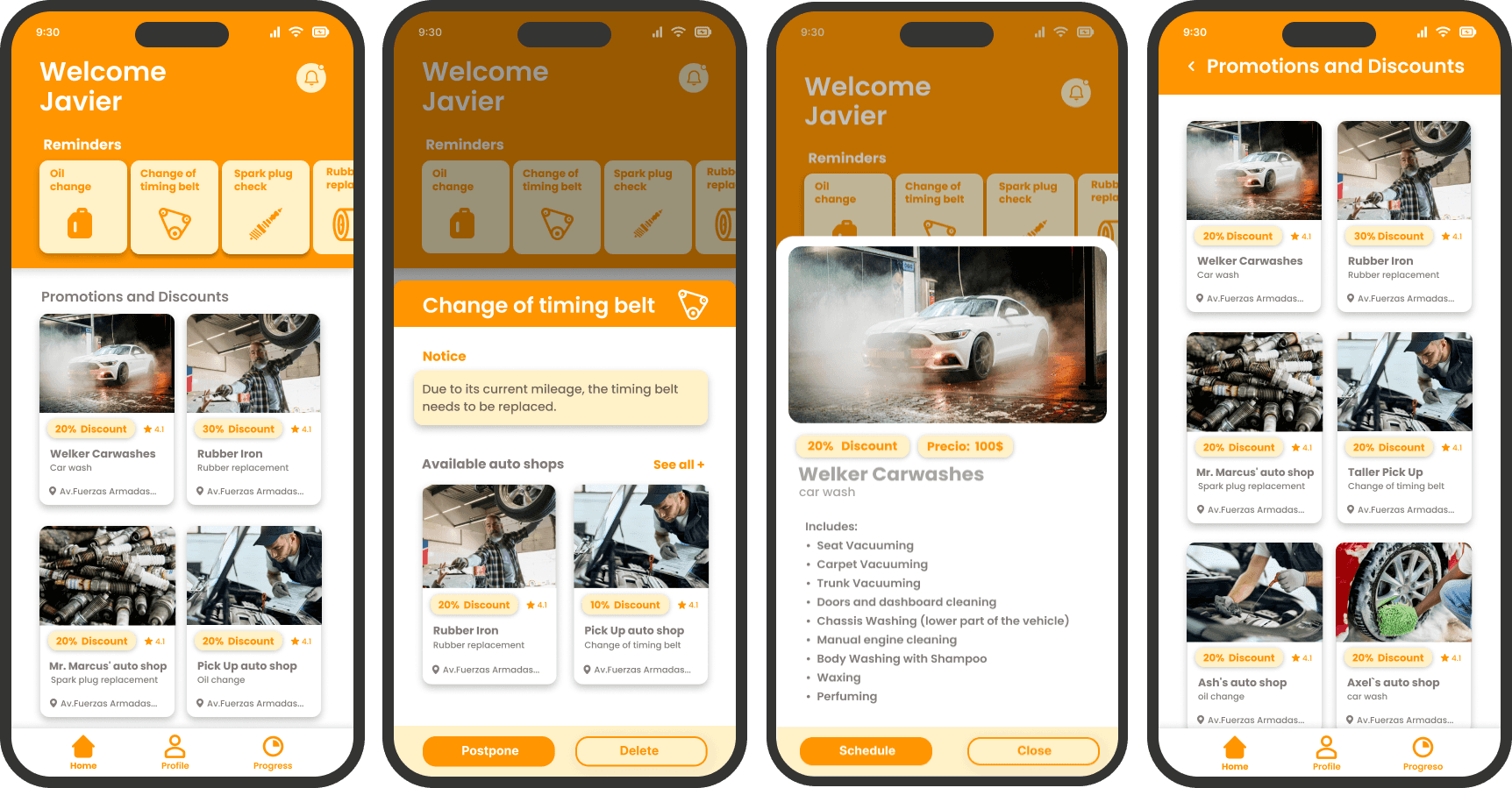
Objetives
-Design the App according to the requirements previously sought.
-Make the user can navigate efficiently through the app.
-Make the app user friendly
-To be able to record maintenance and view workshop suggestions comfortably.
Section Required
-Log in
-Profile
-Main Menu
-Progress section
-Reminders
-Design sistem
Design Process
The working methodology was Sprint, in which specific objectives had to be achieved every week. It was really interesting to work in this way
Interview
An interview was conducted with 10 car owners, the prevalence was 6 men, with age prevalence from 30 to 50 years old, and 4 women from 34 to 45 years old.
How do you manage the maintenance costs of your car ?
Do you think the way you are maintaining your car is efficient in terms of expenses and repairs?
What is the biggest problem you face when taking your car to the workshop?
What is the biggest problem you have regarding the maintenance management of your car?
Do you have a reliable workshop or are you having trouble finding a place to have your car serviced?
why do you need reminders for the maintenance of your car?
Would it be useful for you to keep a digital record of the expenses and repairs made and missing on your car?
Would you use an application to keep track of your car's maintenance and expenses?
Have you had experience with other platforms like this one? If so, tell us about your experience.
What functions do you consider important in app platform like this?
Insights
-Most users do not keep track of their maintenance and finances with respect to car repairs.
-Lack of organization expressed by the interviewees with the maintenance of the car. Because they forget when they have to do it, or they do not have enough time to take it to the workshop.
-Failure to keep track of monthly car expenses, from gasoline to oil changes, affects respondents.
-The biggest problem they face is the lack of trust in the workshop workers because most of the interviewees have had bad experiences in previous workshops.
-Respondents stated that they need reminders to know when to make major changes such as timing belt or oil change in the vehicle.
-Respondents would appreciate knowing how much money they spend on the car per month and in the long term.
-Respondents are not aware of any other platform that performs all the functionalities promised by the app.
-They consider it important to know where they can have their vehicle serviced and if they provide discounts on their services, they also consider it important to write down their own reminders as well as to fill up their gas tank and have the app remember when to perform important maintenance.
User Persona
The data obtained from the interview participants and their insights were taken into account for the creation of these user personas.

Empathy Map
This was the result of the insigth found in the interview conducted with users
Card Sorting
A card sorting was performed with sample users to get a better understanding of the structure of the App.
Information architecture

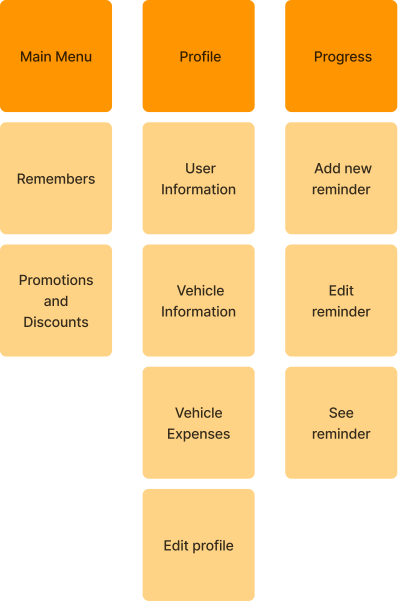

Sketches
Main Menu
Profile
Progress


Low fidelity
High fidelity

User testing
10 participants were recruited through social networks to conduct a remote usability test to find possible improvements in the app, most of the participants understood how to use the platform and 70% said they would continue to use the app.
Task
-1) Open a reminder tab
-2) Select an item under promotions and discounts
-3) Go to the profile section and go to vehicle expenses
4) Edit the car information
-5) Go to the progress section and create a new item
-6) edit an item in the progress section
-7) add an invoice to the added item
Post Test Questions
What was your favorite part of the app?
If you found any task difficult, please tell me which one and why?
Would you continue to use this app?
Would you recommend the app to your acquaintances?
Results
70% of the participants enjoyed this particular experience and would continue to use the application.
90% of the participants were able to complete all the tasks successfully.
10% of the participants were unable to complete some of the tasks and complained about the experience.
What I learn
Design system
I learned to identify and find users interested in sharing their opinions about the app through social media groups.
I also learned to follow the suggestions of users so that in future developments of the MVP I can add the relevant search engines to improve the quality of the user experience of the app.
Comments
Positive
“It's well organized and I like that I can see the places where they perform maintenance.”
“I like that I can see the progress of what I have already done on the car.
"I find the expense chart interesting.”
Negative
“I don't like that it is called “item” , when I go to register a service I perform on the car”.
“I would like to have a search engine in case I need a particular service”.
Suggestions
“I would like to be able to search for specific workshops and not just services.”
I would like a different color to classify each service category.
Participation Profile
The population of 10 participants is made up of adults 30-55 years old, with a higher percentage of men than women, most of the participants have professions between managers, executives, health professionals, business owners and engineers.
Icons
Background colors of the detail
Text color and fields color
Color detail

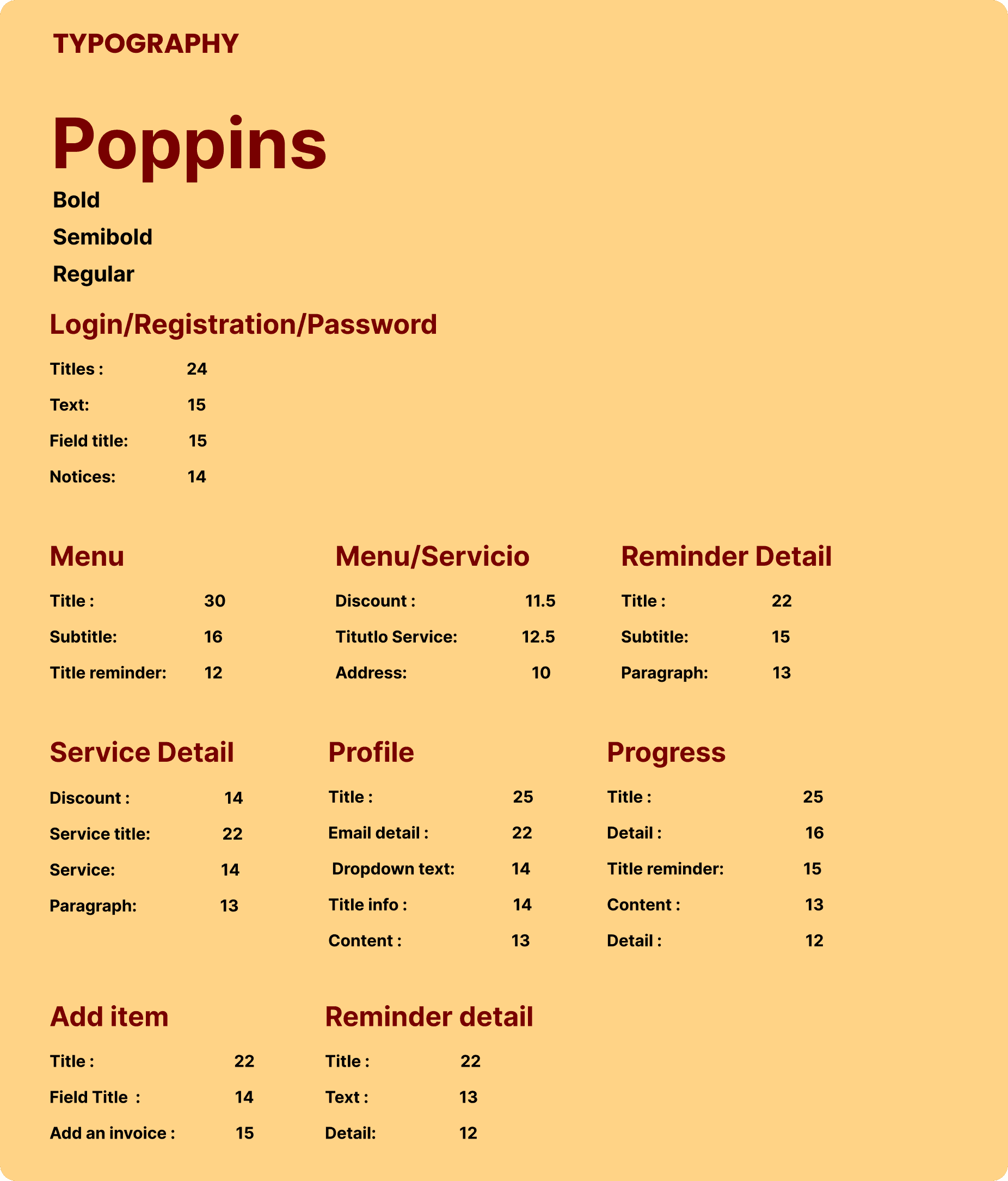
Logo
Text
Main colors
Field colors
Detail
Background detail
Icons